

The 13-week cash flow forecast has a reputation problem. It comes out of restructuring work: when a company is in trouble, its lenders want to see, week by week, whether it makes it through the quarter. So healthy SaaS companies tend to skip it and plan cash the way they plan everything else, in monthly columns. That is a mistake. The 13-week format is the cleanest way to see the next quarter of cash, and a subscription business has better raw material for it than any turnaround CFO ever had: every renewal has a date, an amount and a payment method, sitting in your billing system right now. This guide covers what the forecast is, how to build one in an afternoon, and where the spreadsheet stops being enough. A free template is included.
What a 13-week cash flow forecast is
The format has a specific shape. It uses the direct method: you forecast receipts and payments as they hit the bank, not revenue and expenses as they hit the P&L. It works in weekly buckets, 13 of them, which is one quarter. And it rolls: every week the oldest week drops off, a new week 14 comes in, and the forecast for the week just finished gets compared with what happened.
Why a quarter? Long enough to catch the things that empty an account (the quarterly tax prepayment, payroll landing days before the big annual invoice, the renewal of your own annual software contracts). Short enough that most of the numbers are known rather than assumed. Beyond 13 weeks you are forecasting deals you have not closed. Inside it, you are mostly scheduling cash you already know about.
Why weeks? Because cash runs out on a day, not in a month. A monthly plan can show a comfortable month end while payroll on the 28th lands four days before the invoice that was supposed to pay for it. Weekly buckets catch most of those collisions; for the sharp ones a daily view is better still, and we wrote about that in the Stripe cash flow forecast post. The 13-week forecast is the middle layer between the daily bank balance and the annual plan: the instrument you check every Friday.
Why it fits a subscription business
The direct method has one well-known weakness: you have to predict receipts, and for most businesses that means guessing which invoices get paid when. SaaS is the exception. Most of next quarter's receipts are subscription renewals with a known amount, a known billing date and a known payment method. Trials carry the date they convert. Cancellations are often scheduled weeks ahead. The receipts side of a SaaS 13-week forecast is largely a sorting exercise.
Three wrinkles are specific to SaaS, and the template handles all of them.
MRR is not cash. MRR is deliberately blind to timing: a €12,000 annual contract and twelve €1,000 monthly plans are the same MRR with completely different cash patterns. The forecast needs the invoice-level view, where the annual contract is one receipt in one week.
Money in Stripe is not money in the bank. Card payments settle into your Stripe balance and pay out on a schedule. In the US the standard is two business days after the charge; in Germany and the UK about three business days once the account has some history, seven calendar days for new accounts, and a brand-new account waits 7 to 14 days for its first payout. Payouts arrive net of fees. Invoices paid by bank transfer arrive when the customer's accounts-payable process gets to them, which is rarely on the due date. Every expected receipt has to be shifted by that lag before it goes into a week.
VAT comes in and goes out again. If you invoice with VAT, the cash that lands is gross, and the tax part leaves again on the filing deadline. Forecast receipts gross and give the VAT payment its own line in the week it is due, or the forecast flatters you for exactly as long as it takes the tax office to collect.
How to build one in an afternoon
-
Pick the Monday week 1 starts on, and write down the opening balance: today's balance across all business bank accounts. The bank balance, not the accounting one. Decide on a minimum buffer, the balance you never want to go below. Everything in the forecast is measured against it.
-
Build the receipts side from your billing data. Export active subscriptions and open invoices with amount, next billing date and payment method. Shift each one by its delay to cash: the payout lag for card payments, your real average days-to-pay for bank transfers (not the payment terms, the average). Then put each receipt in the week its money arrives. Card money and bank-transfer money belong on separate lines, because they fail in different ways. Expected new deals get a line of their own, and only the signed or late-stage ones go in; you want to be able to read the forecast with and without them.
-
Build the payments side from your calendar, not your budget. Payroll on payroll day. Rent, tools, ads, contractors. The VAT payment on its deadline, the corporate tax prepayment on its date, loan instalments, and the one-off items that never make it into a monthly budget: the annual renewal of your own software, the hardware for the new hire, the lawyer. Gross amounts, in the week the money leaves.
-
Roll the balance. Opening balance plus receipts minus payments is the closing balance, which becomes next week's opening balance. Subtract the buffer and you have headroom. The week with the lowest headroom is the one that matters. If it is negative, that is the date by which something has to change: a collections push, a delayed hire, a bridge.
-
Keep it alive. Every Friday, enter the actual closing balance next to the forecast one, explain the difference in a sentence, adjust the coming weeks, and roll the window forward by one. Thirty minutes. The variance column is where the forecast earns its keep: it tells you whether your days-to-pay assumption is wrong, whether card failures are worse than you thought, or whether a vendor bills earlier than you remembered.
The template
The template is a plain Excel workbook with four sheets, and it follows the steps above. It has no macros, so it also opens in Google Sheets, Numbers and LibreOffice.
Forecast holds the 13-week grid: opening balance, receipts by line, payments by line, net cash flow, closing balance, buffer and headroom, with the lowest week picked out underneath. Yellow cells are inputs; everything else calculates, and the headroom row turns red in any week that drops below your buffer.
Subscriptions is where the SaaS part happens. Paste your active subscriptions and open invoices, one row each, with amount, billing date and payment method. The sheet shifts each row by your card payout lag or your bank-transfer days-to-pay, nets card payments of your blended fee rate, assigns each receipt to a week, and feeds the two receipt lines on the Forecast sheet. Three example rows show the format; delete them.
Variance lists the 13 weeks with the forecast closing balance next to a cell for the actual one, the difference, and a comment column for the explanation.
How to use repeats the steps in short form, including the SaaS mistakes to watch for.
Download the 13-week cash flow forecast template (.xlsx, free, no signup)
Two conventions: payments are entered as positive numbers, and formulas calculate when the file opens, so a preview pane may show empty cells until you open it in a spreadsheet app.
Where the spreadsheet stops
The template will get you through the first quarter. Its weakness is the one every manual forecast has: the subscription export is stale the moment a customer upgrades, cancels or a new deal closes, and the Friday rebuild is the first thing dropped in a busy week. That is how 13-week forecasts drift back into monthly guesses.
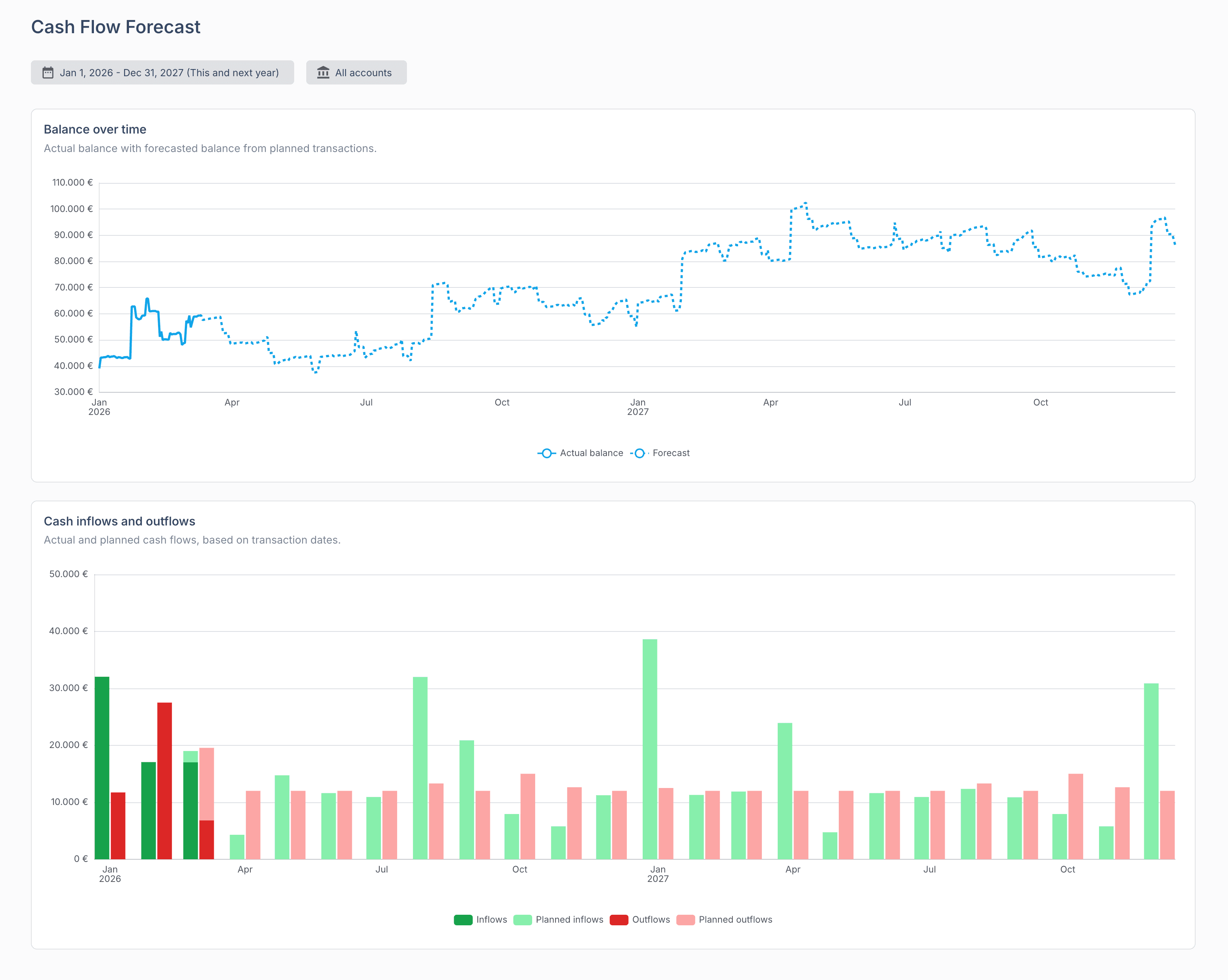
This is the part we built SaaSFlow for. Connect Stripe and your bank accounts, and the receipts side builds itself: every upcoming renewal appears in the projection on the day it bills, shifted to when the money lands, starting from your live bank balance. Add planned transactions for the payments side, one-off or recurring. The result is a cash flow forecast at daily resolution that never needs the Friday rebuild, because it is derived from live data, and it sits on the same numbers as your real-time P&L and subscription analytics. Companies under €10,000 MRR use SaaSFlow free, no credit card.